Introduction
Minecraft is a game about building, exploring, and surviving. But over the years, the modding community has turned it into something much bigger. You want magic? There’s a mod. You want guns? There’s a mod. You want Pokémon? Yes, even that.
And then there’s Jenny Mod.
If you’ve been active in Minecraft forums, YouTube comment sections, or Discord servers, you’ve seen this name pop up. Some people talk about it like it’s a secret. Others warn you to stay away. And a lot of people are just confused — what actually is this mod? Why is it so famous? And more importantly, how do you even get it?
I wrote this guide because my own users on ccPlay.org kept asking. Over and over again. So instead of repeating myself, I sat down and put together everything I know about Jenny Mod — the good, the bad, and the unusual.
Let’s start from the beginning.
What Is Jenny Mod?
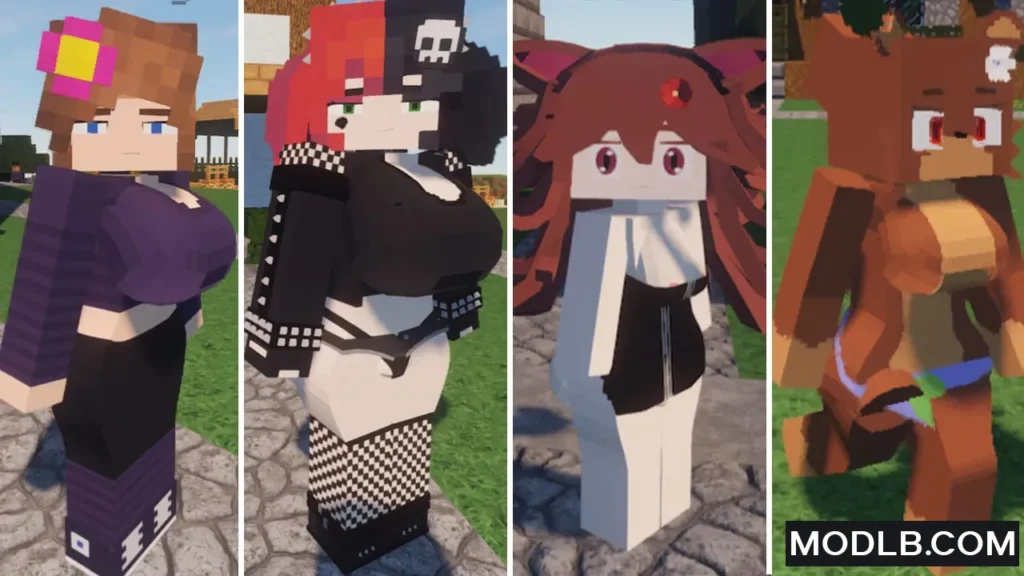
Jenny Mod is an unofficial, fan-made modification for Minecraft Java Edition. It adds one main thing to the game: a new character named Jenny.
Jenny is an NPC — a non-player character — that you can summon, talk to, and interact with. She has custom dialogue, unique animations, and a full set of behaviors that you won’t find in the base game.
That sounds normal, right? Minecraft has plenty of NPC mods. There are mods that add shopkeepers, quest givers, guards, and even friendly monsters.
So what makes Jenny Mod different?
The difference is in the nature of the interactions. Jenny Mod is designed around romantic content. Without getting into unnecessary detail, the mod includes interactions that are clearly not meant for young players. This is not a family-friendly mod. It’s not something you’d show on a kid-friendly YouTube channel. And it’s definitely not something you’d install on a public server.
In fact, the unique nature of Jenny Mod is the entire reason it became famous. People were curious. They made videos (often with clickbait thumbnails). The mod spread through word of mouth, Discord servers, and various mod websites. Soon, everyone had at least heard the name — even if they’d never actually seen it in action.
So yes. Jenny Mod is real. It works. And it’s exactly what people say it is.
Where Did Jenny Mod Come From? (History and Origins)
The exact origin of Jenny Mod is surprisingly hard to trace. Unlike popular mods like OptiFine, Biomes O’ Plenty, or Create, Jenny Mod was never released on CurseForge or Modrinth. Those are the two largest, most trusted platforms for Minecraft mods. If a mod isn’t on either of them, that’s usually a red flag.
So where did Jenny Mod first appear?
Based on forum archives and old Reddit posts, the earliest versions of Jenny Mod started circulating around 2019–2020. The files were uploaded to random third-party mod sites — the kind that are full of pop-up ads, fake download buttons, and suspicious redirects. No single creator ever publicly claimed ownership. No official Discord server or Patreon page was ever linked.
This anonymity is unusual. Most mod creators want credit. They want donations. They want to build a community around their work. But Jenny Mod stayed in the shadows. That alone tells you something about the mod’s nature and the risks involved.
Over time, different versions appeared. Some were made for Minecraft 1.12.2. Others were ported (unofficially) to newer versions like 1.16.5 or 1.18.2. But none of these ports were ever verified or approved by an original creator — because nobody knows who the original creator even was.
Today, Jenny Mod exists in dozens of variations. Some are the real mod. Some are fake files designed to infect your computer. And some are just renamed versions of other NPC mods trying to cash in on the name.
This brings us to the most important question…
Is Jenny Mod Safe? (Security and Risks)
I’m going to be straight with you. Downloading Jenny Mod is risky.
Not because the mod itself is necessarily dangerous — but because of where you have to get it from.
Let me explain.
When you download a mod from CurseForge, you know it’s been scanned for malware. When you download from Modrinth, you know the file is clean. These platforms have teams of people checking every upload. They have reputation systems. They have community reporting. If a mod tries to harm your computer, it gets removed quickly.
Jenny Mod is not on any of those platforms.
To get Jenny Mod, you have to visit third-party mod sites. And here’s what you’ll find there:
- Fake download buttons that install adware
- Pop-up ads that try to trick you into clicking
- Files that are not actually Jenny Mod (just empty jars or viruses)
- Links to survey scams and browser hijackers
Even if you find a real, working version of Jenny Mod, you’re still taking a chance. You’re downloading a file from an untrusted source, created by an unknown person, with no code review, no virus scan, and no accountability.
I’ve seen people lose their Minecraft accounts because a fake mod stole their login session. I’ve seen people get their browsers hijacked by adware. I’ve seen people infect their entire PC because they wanted one mod.
So is Jenny Mod safe? The honest answer is: not really. You might get lucky and find a clean file. But you’re gambling with your computer’s security.
If you understand the risks, that’s your choice. But don’t say nobody warned you.
How to Install Jenny Mod (Technical Steps — For Informational Purposes Only)
A lot of my users ask for the actual installation steps. So here they are. This is how people install Jenny Mod, based on community guides and forum posts.
Important: I am not telling you to do this. I’m just answering the question “how does it work?” for those who are curious.
Step 1: Use Minecraft Java Edition
Jenny Mod only works on Minecraft Java Edition. It does not work on Bedrock Edition (Windows 10/11 version from Microsoft Store), console, or mobile. If you’re playing on a phone, tablet, Xbox, PlayStation, or Nintendo Switch — forget it. You cannot install this mod.
Step 2: Install Minecraft Forge
Jenny Mod requires Forge, a mod loader that lets you run custom mods. Most versions of Jenny Mod are built for Minecraft 1.12.2, so you’ll need Forge for that specific version. Download Forge from the official website. Install it by running the installer and selecting “Install Client.”
Step 3: Find a Jenny Mod Download (The Hard Part)
This is where it gets tricky. You need to find a working download link for Jenny Mod. I will not provide one here. If you search Google or YouTube, you will find many links. Most are fake. Some are real. Use a virus scanner before opening any file.
Step 4: Move the File to Your Mods Folder
Once you have the Jenny Mod .jar file, you need to place it in the correct folder. On Windows, that’s usually:
C:\Users\YourName\AppData\Roaming\.minecraft\mods
If the mods folder doesn’t exist, create it.
Step 5: Launch Minecraft with Forge
Open the Minecraft Launcher. At the bottom left, click the dropdown menu and select the Forge profile (usually named “Forge 1.12.2”). Press play. If everything worked, Jenny Mod will be active.
Step 6: Summon Jenny in Game
Once you’re in a world, you should see a new item in your inventory — usually a spawn egg or a special wand. Use it to summon Jenny. From there, the mod’s interactions become available.
That’s the process. Simple in theory. Risky in practice.
Can You Use Jenny Mod on Servers? (Multiplayer Reality)
Short answer: No.
Long answer: Almost certainly no.
Public Minecraft servers like Hypixel, Mineplex, Cubecraft, and most survival or mini-game servers have anti-cheat plugins. These plugins scan for unusual mods. Jenny Mod adds custom NPCs and custom interactions — both of which are highly unusual. Even if you don’t use the mod on that server, simply having it installed in your mods folder can sometimes trigger a ban.
Private servers are also risky. If you own the server and you invite friends, you might think it’s fine. But Jenny Mod was never designed for multiplayer. The NPC behavior can glitch, crash the server, or cause other players to see errors.
There are no known public servers that officially allow Jenny Mod. If someone tells you otherwise, they’re either lying or running a very small, very hidden server.
Keep this mod in single-player only. That’s the only place it even partially works.
Who Is Jenny Mod For?
Not for young players.
This should be obvious, but I’ll say it anyway. Jenny Mod contains interactions that are not meant for young players. If you’re a parent, make sure your child isn’t downloading it.
Not for public content creators.
If you have a YouTube channel, Twitch stream, or any public Minecraft content, do not use Jenny Mod. You will get demonetized, banned from platforms, and lose your audience. It’s not worth it.
Not for people who care about security.
If you’re not comfortable downloading files from unknown websites, skip this mod entirely. There are thousands of other mods that are safe, fun, and family-friendly. Jenny Mod is not one of them.
For players playing alone.
If you’re playing on your own private single-player world, and you fully understand the security risks — then the choice is yours. Nobody is stopping you. Just be smart. Use a virus scanner. Don’t enter your Minecraft password into any weird pop-ups. And don’t expect any technical support if something breaks.
Alternatives to Jenny Mod (Better, Safer Options)
If you’re interested in NPC mods but don’t want the security risks, here are some safe alternatives:
CustomNPCs – One of the most popular NPC mods ever made. Lets you create characters, give them dialogue, set up quests, and build entire RPG-style stories. Completely family-friendly.
MCA (Minecraft Comes Alive) – Overhauls villagers into actual characters with personalities, relationships, and family mechanics. Very well made.
Tektopia – Another villager overhaul mod with deep simulation mechanics. Your villagers have jobs, moods, and social interactions. Safe and creative.
These mods are all available on CurseForge. No viruses. No fake download buttons. No risk.
Final Thoughts
Jenny Mod Minecraft is real. It’s unusual. It’s risky. And it’s not going away anytime soon.
If you were just curious — now you know what it is.
If you want to try it — that’s your call, but at least you’re going in with your eyes open.
If you’re a parent or a younger player — stay far away and stick to the safe alternatives.
I wrote this guide because my own users on ccPlay.org kept asking for straight answers. No clickbait. No fear-mongering. Just facts.
Now you have them.